









Introduction: live streaming is a distribution service, not just a camera feed
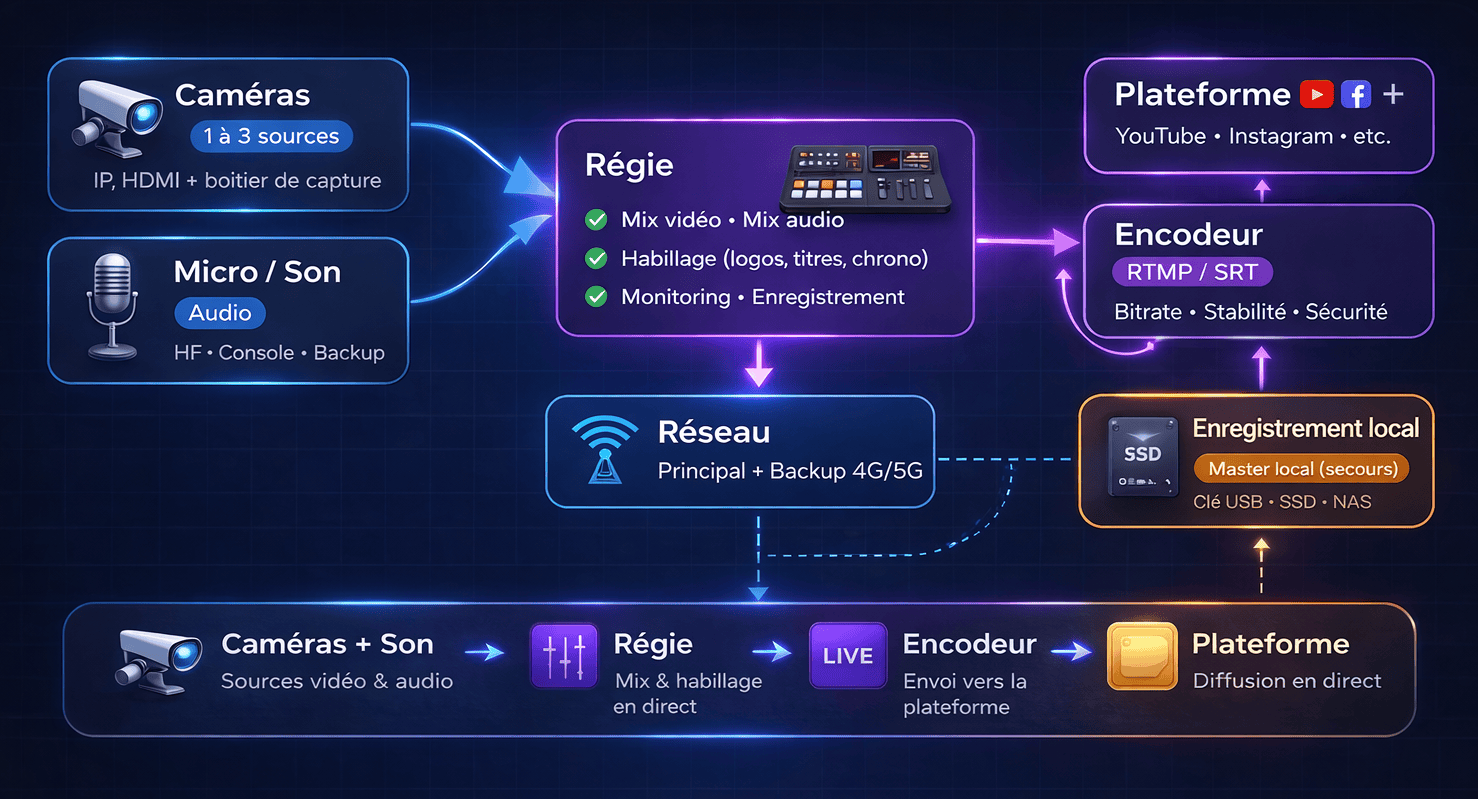
When a client asks for a live stream, they often imagine "one camera plus internet." In reality, live broadcasting looks more like a mini TV channel: you need capture, switching, encoding, network security, quality monitoring and contingency management, all without a second chance.
In this article, I explain what makes the price rise and, more importantly, which lower-cost alternatives can deliver almost the same result in terms of visibility, memories and engagement without blowing up the budget.
Why live streaming costs so much
The price of a live stream mostly reflects one thing: risk. In live conditions, every issue, whether audio, network, battery, cable, camera, encoding or platform, is immediately visible. To reduce that risk, you add preparation, equipment and people.
- More roles: camera operator(s), control room, sound engineer, assistant and sometimes chat moderation.
- More technical gear: video switcher, encoder, monitoring, intercom, audio routing and power management.
- More redundancy: dual recording, 4G or 5G backup, audio fallback, spare batteries and cables.
- More preparation: network scouting, platform tests, rehearsals and timing alignment with speakers.
- More constraints: music rights, permissions, stream security and confidentiality depending on the event.
What you are really paying for
These are the main cost items that explain the gap between simple filming and live broadcasting.
1) The control room, the brain of the live stream
A control room lets you cut to the right camera at the right moment, display titles, integrate slides, manage audio, balance the image and output a clean program. Without it, a live stream quickly looks like a webcam.
2) Connectivity, the most underestimated part
On-site internet is rarely guaranteed. Wi-Fi can be unstable, 4G can be saturated and upload speed can be weak. Serious setups plan backup solutions: 4G or 5G router, bonded connections, speed tests and sometimes a dedicated line.
3) Sound, the thing that ruins a live stream
Average picture can pass. Bad sound cannot. Wireless microphones, mixing, wind protection, foldback and a backup recorder are often what push the result toward a broadcast-grade feel.
4) Multi-camera, and multiplied risk
As soon as you move from one camera to two or three, you add synchronization, cabling, operators, monitoring and a significant coordination load.
How much does it cost? 3 simple scenarios
Every event is different, but these reference points help frame the discussion.
Scenario A: simple live stream
- Best for announcements, behind-the-scenes coverage or a short talk.
- Limits: strong network dependency and very little staging.
Scenario B: professional live stream
- Best for conferences, ceremonies and product presentations.
- More value: pacing, cutaway shots, clean sound and possible graphics.
Scenario C: premium secured live stream
- Best for critical events, brands, large audiences and sponsored broadcasts.
- Goal: drastically reduce the risk of visible failure.
A useful question is this: what is the cost of a visible incident such as a dropout, inaudible sound or frozen image during your event? That is usually what should drive the service level.
More affordable alternatives without losing the essentials
The good news is that, very often, the real need is not "live" but freshness, meaning publishing quickly, or presence, meaning giving remote access. Here are efficient alternatives.
1) Live-to-tape: record like a live show, publish quickly
You shoot as if it were live, possibly with multiple cameras, make a clean fast cut and publish within two to six hours. The audience still gets a near-live feeling, but you remove the stress of a visible failure.
2) YouTube or Facebook Premiere: fake live, real appointment effect
You publish an edited video, even a short one, and schedule it as a premiere. The chat is active, the event effect is there, but you keep total control over the final output.
3) Stories, reels and recap: the combo that often converts better
For many events, a long live stream is barely watched. A mix of real-time stories, reels and a recap often captures more attention, costs less and remains reusable for communication afterward.
4) Smartphone-only coverage: often suggested, but not our approach
Some providers or internal teams offer a smartphone live stream. That can be enough for a very simple format with limited stakes, but it also increases risk on stability, light, audio, compression and premium perception.
At QR-cadre, we do not sell smartphone-only live streams. Our affordable and efficient alternative is live event content: capture with a professional camera and microphone, then fast editing and on-site publishing through a dedicated smartphone optimized for quick turnaround.
For a one-off need with fast publication during an event, use the contact form so the format can be adapted to your budget, timing and expected volume.
Checklist: a simple live stream that does not look amateur
- Sound: lav mic or mixer feed, plus a backup recording.
- Stability: tripod or gimbal, with a clean static frame.
- Lighting: one soft light facing the speaker, even a small LED helps.
- Network: upload test, plan B with 4G or 5G, and reset checks before going live.
- Platform: RTMP key configured, private test done, thumbnail ready, description ready.
- Backup plan: always record locally even if the stream drops.
7 concrete ways to reduce the bill
- Shorten the duration: a well-paced 45 to 60 minutes is often better than three hours.
- Limit multi-camera setup: one main camera plus one static wide shot.
- Avoid complex graphics: one title and one opening slate are often enough.
- Put the energy into sound: that is where the fastest return usually is.
- Choose premiere or live-to-tape if true live is not essential.
- Do a network check, even 15 minutes, to avoid surprises.
- Clarify the deliverable: live stream plus replay plus extracts, or just the live stream?
Conclusion: the right choice is the right level of risk
Live streaming is expensive because it requires organization, meaning a control room, guarantees, meaning network and redundancy, and technical control, meaning audio, image and coordination, that simple filming does not require.
If your goal is mainly to make the event feel alive, alternatives such as live-to-tape, premieres, stories and recap are often more cost-effective and easier to reuse across social media.
Want help choosing the right format, live stream or lighter alternative? Use the contact form and we will suggest a solution that fits your budget.